This is our Demo store. We do not accept any payment from here. If some one is asking about payment then contact us on mobile. 9935149636 Dismiss

ADD ANYTHING HERE OR JUST REMOVE IT…
  • Newsletter
  • FAQs
Select category
  • Select category
  • 8051 Projects
  • Accessories
  • Arduino Projects
  • Arduino Projects With Android App
  • Blynk App IOT Project
  • Electrical Projects
  • ESP32 Camera Projects
  • ESP32 Projects
  • ESP8266 Projects
  • Gsm Interfaced Projects
  • Mini Projects
  • Our TOP IOT Projects
  • PI PICO W Projects
Login / Register
0 Wishlist
0 Compare
0 items / ₹0.00
Menu
projectiot
0 items / ₹0.00
Browse Categories
  • ESP32 Projects
  • ESP8266 Projects
  • 8051 Projects
  • PIC Microcontroller Projects
  • Arduino Projects
  • Blynk App IOT Project
  • Our TOP IOT Projects
  • Arduino Projects With Android App
  • ESP32 Camera Projects
  • Electrical Projects
  • Mini Projects
  • PI PICO W Projects
  • Home
  • Shop
  • Track Order
  • Contact Us
  • About us
360 product view
    0%
    Click to enlarge
    Home ESP8266 Projects MCB Fault Status Monitor Using NodeMcu & notification to Telegram)
    Obstacle Avoiding Robot Using Arduino
    Obstacle Avoiding Robot Using Arduino ₹3,000.00
    Back to products
    Auto Phase Selector Using Ardunio
    Auto Phase Selector Using Ardunio ₹3,500.00

    MCB Fault Status Monitor Using NodeMcu & notification to Telegram)

    ₹4,000.00

    Weight 2 kg

    1 in stock

    Compare
    Add to wishlist
    SKU: AP-247273 Categories: ESP8266 Projects, Our TOP IOT Projects Tags: ESP8266, IOT
    Share:
    • Description
    • Reviews (0)
    • Fill Form & Contact us
    Description

    Build a 4 MCB circuit with Telegram notification using optoisolators

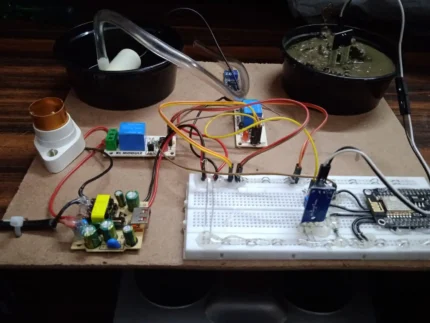
    We are monitoring 4  * MCB in our project. User will receive notification, If any MCB goes tripped then device will send message on predefined telegram channel. All MCB’s are interfaced with NodeMcu WiFi Module. This circuit can be used to send notifications to a Telegram channel whenever one of the MCBs trips.

    Connect the MCBs to the optoisolator

    Connect the 4 MCBs to the optoisolator. The common terminal of each MCB should be connected to the A (anode) terminal of the optoisolator. The NC (normally closed) terminal of each MCB should be connected to the K (cathode) terminal of the optoisolator.

    Connect the optoisolators to the NodeMCU

    Connect the optoisolator to the NodeMCU as shown in the following diagram. The VCC (positive) terminal of each optoisolator should be connected to the 3.3V pin on the NodeMCU. The GND (negative) terminal of each optoisolator should be connected to the GND pin on the NodeMCU. The OUT (output) terminal of each optoisolator should be connected to a digital pin on the NodeMCU.

    Create a Telegram bot

    To create a Telegram bot, you will need to chat with BotFather, a bot that can create other bots. To do this, open the Telegram app and search for “BotFather”. Then, start a chat with BotFather and follow the instructions to create a new bot.

    Once you have created your bot, you will need to get its token. The token is a long string of characters that will allow you to control your bot. To get your bot’s token, open the chat with BotFather and type the following command:

    /token
    

    BotFather will then respond with your bot’s token.

    Configure your Telegram bot

    To configure your Telegram bot to send notifications when an MCB trips, you will need to edit its configuration file. The configuration file is a .json file that is located in the Telegram bot’s directory.

    To open the configuration file, you can use a text editor like Notepad or Sublime Text. Once you have opened the configuration file, you will need to add the following code to the on_message section:

    JSON
    {
      "chat_id": "YOUR_CHANNEL_ID",
      "text": "MCB tripped"
    }
    

    Replace YOUR_CHANNEL_ID with the ID of your Telegram channel.

    Once you have saved the configuration file, your bot will start sending notifications to all of the users in your channel whenever an MCB trips.

    Here are some additional tips for configuring your Telegram bot to send notifications:

    • You can use the chat_id property to specify the ID of the chat where you want to send notifications.
    • You can use the text property to specify the text of the notification.
    • You can use the parse_mode property to specify how the text of the notification should be formatted.

    Test your circuit

    Once you have configured your Telegram bot, you can test your circuit by tripping one of the MCBs. If your circuit is working correctly, you should receive a notification on Telegram.

    Here are some additional tips for creating this circuit:

    • Use a high-quality optoisolators to ensure that they can handle the current from the MCBs.
    • Use a breadboard with enough space to accommodate all of the components in the circuit.
    • Make sure that all of the connections in the circuit are secure.


    mcb_fault_finder_telegram
    Loading
    Reviews (0)

    Reviews

    There are no reviews yet.

    Only logged in customers who have purchased this product may leave a review.

    Fill Form & Contact us

    Loading

    You may also like…

    Add to cart
    Quick view
    Compare
    Add to wishlist

    Air Quality Monitoring Project with ESP32 and P10 LED Matrix Displays

    ESP32 Projects, Our TOP IOT Projects
    Rated 0 out of 5
    ₹6,000.00
    Sold out
    Read more
    Quick view
    Compare
    Add to wishlist

    IOT Weather Station Using ESP32 Wifi Module

    ESP32 Projects, Our TOP IOT Projects
    Rated 0 out of 5
    ₹6,000.00
    Add to cart
    Quick view
    Compare
    Add to wishlist

    Soil Moisture Controller using Blynk App

    Blynk App IOT Project
    Rated 0 out of 5
    ₹2,000.00
    Sold out
    Read more
    Quick view
    Compare
    Add to wishlist

    P10 Led Matrix Display using ESp32 Wifi

    ESP32 Projects, Our TOP IOT Projects
    Rated 0 out of 5
    ₹3,000.00

    Related products

    Add to cart
    Quick view
    Compare
    Add to wishlist

    Dustbin Status Monitor Using IOT Interfaced

    ESP32 Projects, Our TOP IOT Projects
    Rated 0 out of 5
    ₹5,000.00Nos
    Placeholder
    Add to cart
    Quick view
    Compare
    Add to wishlist

    Home Automation via Telegram Message

    ESP8266 Projects, Our TOP IOT Projects
    Rated 0 out of 5
    ₹3,000.00
    Add to cart
    Quick view
    Compare
    Add to wishlist

    Under Ground Cable Fault Detector Using Arduino

    Accessories
    Rated 0 out of 5
    ₹4,500.00
    Add to cart
    Quick view
    Compare
    Add to wishlist

    Home Automation Using Voice Controlled Android App

    ESP8266 Projects, Our TOP IOT Projects
    Rated 0 out of 5
    ₹3,500.00
    Placeholder
    Add to cart
    Quick view
    Compare
    Add to wishlist

    IOT Plant Monitor on ThingSpeak

    ESP32 Projects
    Rated 0 out of 5
    ₹4,500.00
    Add to cart
    Quick view
    Compare
    Add to wishlist

    Finger Print Based Voting Machine Using Arduino with WiFi

    Arduino Projects, ESP8266 Projects
    Rated 0 out of 5
    ₹10,000.00
    Add to cart
    Quick view
    Compare
    Add to wishlist

    Arduino-Based Health Monitoring System Using MAX30100, LCD, and Blynk

    Blynk App IOT Project
    Rated 0 out of 5
    ₹3,000.00
    Add to cart
    Quick view
    Compare
    Add to wishlist

    IOT Interfaced Green House Controller

    Arduino Projects, ESP8266 Projects, Our TOP IOT Projects
    Rated 0 out of 5
    ₹8,000.00
    2025 CREATED BY http://projectiot.in. PREMIUM PROJECT SOLUTIONS.
    payments
    • Menu
    • Categories
    • ESP32 Projects
    • ESP8266 Projects
    • 8051 Projects
    • PIC Microcontroller Projects
    • Arduino Projects
    • Blynk App IOT Project
    • Our TOP IOT Projects
    • Arduino Projects With Android App
    • ESP32 Camera Projects
    • Electrical Projects
    • Mini Projects
    • PI PICO W Projects
    • Home
    • Shop
    • Track Order
    • Contact Us
    • About us
    Shopping cart
    close

    Sign in

    close

    Lost your password?

    No account yet?

    Create an Account

    HEY YOU, SIGN UP AND CONNECT TO WOODMART!

    Be the first to learn about our latest trends and get exclusive offers

    Will be used in accordance with our Privacy Policy

    Shop
    0 Wishlist
    0 items Cart
    My account