


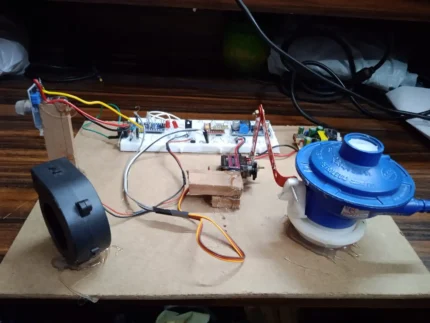

I am text block. Click edit button to change this text. Lorem ipsum dolor sit amet, consectetur adipiscing elit. Ut elit tellus, luctus nec ullamcorper mattis, pulvinar dapibus leo.

Project Report: Prepaid Energy Meter with Tampering Protection
1. Introduction
The traditional post-paid energy metering system, prevalent in many parts of the world, often suffers from issues such as billing inaccuracies, delayed payments, and challenges in revenue collection for utility providers. Furthermore, energy theft through various tampering methods poses a significant financial burden on these utilities and leads to an unfair distribution of costs among consumers. This project addresses these challenges by proposing a “Prepaid Energy Meter with Tampering Protection,” offering a smart and secure solution for energy consumption management.
This system leverages the convenience of mobile SMS for balance recharge and incorporates robust mechanisms to detect and alert against common tampering attempts. By providing consumers with real-time control over their energy usage and empowering utilities with enhanced security features, this project aims to foster a more efficient, transparent, and equitable energy distribution network.
2. Project Objectives
The primary objectives of this project are:
- To develop a prepaid energy metering system: Enable users to purchase energy credits in advance, thereby eliminating the complexities of post-paid billing.
- To implement SMS-based recharge functionality: Allow users to recharge their energy meter remotely by sending specific SMS codes.
- To provide low balance alerts: Notify users when their energy balance is nearing depletion, prompting timely recharge.
- To incorporate automatic power disconnection: Disconnect power supply when the energy balance reaches zero, ensuring responsible energy consumption.
- To implement tamper detection mechanisms: Identify and alert against physical tampering with the energy meter and attempts to bypass the energy measurement circuit.
- To provide real-time tamper alerts: Send immediate SMS notifications to a predefined mobile number upon detection of any tampering.
- To ensure robust and reliable operation: Design a system that is stable, accurate, and resilient to environmental factors.
3. System Architecture
The Prepaid Energy Meter with Tampering Protection system is designed with a modular architecture, integrating several key components to achieve its objectives. The core of the system revolves around the Arduino Nano microcontroller, which acts as the central processing unit, orchestrating the communication and control functions.
Figure 1: System Architecture Diagram
[Conceptual Diagram - Replace with actual block diagram in final report]

Power Supply (230V AC) --> |
                            |
                            V
Energy Meter (Input) -----> Power Relay (NC) ---------> Load (Lamp)
                            ^
                            | (Controlled by Arduino)
                            |
Current Transformer (CT) ---+-----> Interfacing Circuit --> Arduino Nano
                            |
SPDT Switch (Tamper 1) -----+-----> Digital Input (Arduino)
                            |
SIM800L GSM Module <-------+-----> UART (Arduino)
                            |
Predefined Mobile Number <--+-----> SMS Communication
                            |
External Power Supply (for Arduino, GSM)
Key Components and their Roles:
- Arduino Nano: The brain of the system, responsible for reading energy consumption data, managing balance, processing SMS commands, controlling the relay, and detecting tampering.
- SIM800L GSM Module: Enables two-way communication via SMS for recharge commands, low balance alerts, and tamper notifications.
- Energy Meter: A standard single-phase energy meter modified with a pulse output or directly read via current transformer for energy consumption measurement.
- Current Transformer (CT) with Interfacing Circuit: Measures the instantaneous current flowing through the load. The interfacing circuit converts the CT’s output into a usable signal for the Arduino. This is crucial for energy measurement and bypass detection.
- Relay Module: An electromagnetic switch controlled by the Arduino to connect or disconnect the main power supply to the load based on the energy balance.
- SPDT (Single Pole Double Throw) Switch: Functions as a tamper detection switch, specifically for detecting attempts to open the energy meter’s casing.
- Lamp & Lamp Holder: Represents the electrical load being powered and controlled by the system.
- Power Supply: Provides regulated DC power to the Arduino Nano, GSM module, and other low-voltage components.
4. Hardware Implementation
4.1. Arduino Nano
The Arduino Nano is a compact, breadboard-friendly microcontroller board based on the ATmega328. Its small form factor, ample I/O pins, and ease of programming make it an ideal choice for this project. It will be responsible for:
- Reading current consumption data from the CT.
- Calculating energy consumed.
- Maintaining and updating the energy balance.
- Interpreting incoming SMS commands from the SIM800L.
- Sending outgoing SMS notifications via the SIM800L.
- Controlling the relay to switch power to the load.
- Monitoring the SPDT tamper switch.
- Detecting bypass wiring using the current transformer.
4.2. SIM800L GSM Module
The SIM800L is a popular and cost-effective GSM/GPRS module that facilitates cellular communication. It will be connected to the Arduino Nano via serial communication (UART). Key functionalities include:
- Receiving SMS: The module will be configured to receive SMS messages from the user’s mobile number containing recharge codes.
- Sending SMS: It will send low balance alerts, successful recharge confirmations, and tamper notifications to predefined mobile numbers.
- Network Registration: The module automatically registers with the available GSM network upon power-up.
4.3. Energy Meter and Current Transformer (CT) with Interfacing Circuit
The project utilizes a standard energy meter, but the energy consumption measurement is primarily handled by the Current Transformer (CT).
- Current Transformer (CT): A non-invasive sensor that measures AC current flowing through a conductor by inducing a proportional current in its secondary coil. The main phase wire of the load will pass through the core of the CT.
- CT Interfacing Circuit: The output of the CT is typically a small AC voltage or current. This signal needs to be conditioned before it can be read by the Arduino’s analog-to-digital converter (ADC). The interfacing circuit will likely consist of:
- Burden Resistor: To convert the CT’s secondary current into a voltage.
- Voltage Divider/Level Shifter: To bring the CT output voltage within the Arduino’s ADC measurement range (0-5V).
- Biasing Circuit: To shift the AC signal’s baseline to a positive DC voltage, as the Arduino’s ADC can only read positive voltages. This is crucial for accurately measuring the AC waveform.
- Low-pass Filter (Optional): To remove high-frequency noise from the signal.
By continuously sampling the CT’s output, the Arduino can calculate the RMS current and, assuming a constant voltage (e.g., 230V AC), estimate the instantaneous power and accumulate it over time to determine energy consumption in Watt-hours (Wh) or Kilowatt-hours (kWh).
4.4. Relay Module
A single-channel relay module will be used to control the power supply to the load (lamp). The relay has a normally closed (NC) contact connected in series with the main phase line to the load.
- Functionality:
- When the energy balance is positive, the Arduino will energize the relay coil, opening the NC contact, thereby allowing power to flow to the load. (Correction: If it’s Normally Closed (NC), energizing will open it. For normal operation where power is supplied when balance is positive, you would want a Normally Open (NO) configuration. Assuming it’s a standard relay module where a digital HIGH signal from Arduino turns on the relay and closes the NO contact, and a digital LOW turns it off, opening the NO contact.) Let’s assume you’re using a standard relay module where applying a HIGH signal from Arduino closes the relay’s internal switch, connecting the load.
- When the energy balance reaches zero, the Arduino will de-energize the relay, opening the contact and disconnecting power to the load.
4.5. SPDT Switch
A Single Pole Double Throw (SPDT) switch will be strategically placed within the energy meter’s casing or at a critical access point.
- Tamper Detection: When the energy meter casing is opened, the switch’s state will change (e.g., from closed to open or vice-versa), triggering an interrupt or a change in digital input state on the Arduino.
- Notification: Upon detecting this change, the Arduino will immediately send an SMS alert to the predefined mobile number, indicating “Energy Meter Casing Tampered.”
4.6. Power Supply
A stable and regulated DC power supply is essential for the reliable operation of the Arduino Nano and the SIM800L GSM module.
- Voltage Requirements: The Arduino Nano typically operates at 5V, while the SIM800L requires 3.7V to 4.2V (often supplied by a 5V source with a voltage regulator).
- Current Capacity: The power supply must be capable of providing sufficient current, especially during GSM module transmission bursts, which can draw significant current (up to 2A).
5. Software Implementation (Arduino Sketch)
The Arduino sketch will be the core of the system’s intelligence. It will manage various tasks concurrently, including:
5.1. Initialization
- GSM Module Initialization: Configure the SIM800L for SMS mode, set up baud rate, and ensure network registration.
- Serial Communication: Initialize serial communication for debugging and AT command interaction with the GSM module.
- Pin Definitions: Define all I/O pins for the relay, tamper switch, and CT interfacing circuit.
- Variable Initialization: Set initial energy balance, predefined mobile number, and other system parameters.
5.2. Energy Consumption Monitoring and Calculation
- CT Data Acquisition: The Arduino will continuously read analog values from the CT interfacing circuit.
- RMS Current Calculation: The sampled analog values will be used to calculate the Root Mean Square (RMS) current. This involves sampling the AC waveform over a period, squaring each sample, averaging the squared values, and taking the square root.
- Power Calculation: Instantaneous power will be calculated as P = V * I, where V is assumed to be the nominal supply voltage (e.g., 230V) and I is the calculated RMS current.
- Energy Accumulation: The power will be integrated over time to calculate the total energy consumed (Wh). This can be done by multiplying the average power over a short interval by the duration of that interval and accumulating these values.
- Balance Deduction: The calculated energy consumption will be converted into monetary units (based on a predefined tariff) and deducted from the current balance.
5.3. SMS Command Processing
- Incoming SMS Detection: The Arduino will periodically check for new SMS messages received by the SIM800L.
- SMS Parsing: Received SMS content will be parsed to identify specific recharge codes: “RUcode1”, “RUcode2”, “RUcode3”, “RUcode4”.
- Recharge Logic:
- RUcode1: If “RUcode1” is received, add Rs. 100 to the current balance.
- RUcode2: If “RUcode2” is received, add Rs. 200 to the current balance.
- RUcode3: If “RUcode3” is received, add Rs. 300 to the current balance.
- RUcode4: If “RUcode4” is received, add Rs. 400 to the current balance.
- Confirmation SMS: After a successful recharge, a confirmation SMS will be sent back to the sender, indicating the new balance.
5.4. Low Balance Alert
- Threshold Monitoring: The Arduino will constantly monitor the current energy balance.
- SMS Trigger: When the balance falls below a predefined threshold (e.g., Rs. 5), an SMS alert will be sent to the predefined mobile number, stating “Low Balance! Current balance: Rs. [Current Balance].”
- Frequency Control: Implement a mechanism to avoid sending repeated low balance SMS messages too frequently (e.g., only once per hour until recharged or balance drops significantly further).
5.5. Power Control (Relay Management)
- Balance Check: The Arduino will continuously check the current energy balance.
- Power ON/OFF:
- If the balance is greater than 0, the relay will be activated (closed) to supply power to the load.
- If the balance reaches 0 or goes negative, the relay will be de-activated (opened) to cut off power to the load.
5.6. Tamper Detection Mechanisms
5.6.1. Limit Switch (SPDT Switch) for Casing Tampering
- Digital Input Monitoring: The Arduino will monitor the digital input pin connected to the SPDT switch.
- State Change Detection: If the state of the switch changes (indicating the casing has been opened), an interrupt service routine (ISR) or continuous polling will trigger.
- Tamper Alert SMS: An immediate SMS alert will be sent to the predefined mobile number: “Alert! Energy Meter Casing Tampered!”
5.6.2. Bypass Wire Detection (Phase from Output to Input)
This is a more sophisticated tamper detection method that leverages the current transformer.
- Principle: In a normal operational scenario, current flows from the input phase through the energy meter to the output phase and then to the load. If a bypass wire is used, a portion or all of the load current might bypass the energy meter’s measurement path but still flow through the main circuit. The CT is strategically placed to detect this.
- Implementation Strategy:
- Monitor Current at Input and Output (Conceptual): While one CT is used, the strategy is to infer this. If your CT is placed after the energy meter (on the load side), then the detected current should correspond to the current drawn by the connected load when the relay is ON.
- Detection Logic:
- Condition 1: Relay is OFF (Balance = 0) AND CT detects current: If the energy balance is zero, the relay should be open, and no current should flow to the load. If the CT still detects significant current, it implies a bypass, as the load is drawing power without passing through the controlled circuit.
- Condition 2: Unexpected Current Flow: This is more complex and depends on the precise CT placement. If the CT is placed to measure the total current drawn by the household from the main line, and then you have the energy meter, and then your controlled relay. If the bypass is from input of meter to output of meter, then the CT after the meter might not detect the bypassed current. However, if the CT is placed before the meter (on the main incoming line), it would still detect current, but the balance would be 0, and the relay would be open. This discrepancy is key.
- Refined Bypass Detection Strategy:
- Place the CT on the output side of your energy meter, after the relay.
- Normal Operation: When the relay is ON and balance is positive, the CT measures load current.
- Bypass Scenario: When balance is 0, the relay is OFF. If a bypass wire is connected from the input phase (before the relay) to the output phase (after the relay), then current will flow to the load, and your CT will detect this current.
- Detection Logic:
Arduino


Reviews
There are no reviews yet.