



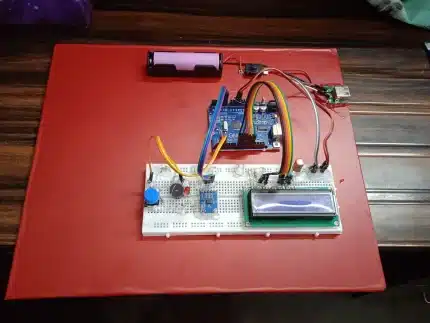

Project Report: IoT-Based Environmental Monitoring System using Raspberry Pi Pico W
- Abstract
This project focuses on the design and implementation of a wireless Environmental Monitoring System utilizing the Raspberry Pi Pico W. The system measures real-time ambient temperature and humidity using a DHT11 sensor. The data is processed locally to be displayed on an I2C LCD module for immediate visual feedback and simultaneously transmitted to a remote web server via Wi-Fi. The data transmission utilizes the HTTP POST method to securely send sensor readings to a PHP-based endpoint (insert_data.php), which logs the information into a MySQL database. The system is powered by a 5V DC source and operates on a 10-second data update interval, offering a robust solution for remote data logging.
- Introduction
In the rapidly evolving field of the Internet of Things (IoT), the ability to collect and analyze physical data remotely is crucial for applications ranging from smart agriculture to industrial server room monitoring. Traditional data loggers often lack real-time connectivity.
Project Objectives:
- Sensing: Accurate acquisition of temperature and humidity data.
- Visualization: Local display of data for on-site users.
- Connectivity: Wireless transmission of data to a centralized server.
- Storage: Permanent logging of data in a relational database (MySQL) for historical analysis.
- System Architecture
The system follows a typical IoT node-to-cloud architecture:
- Sensor Node: The Raspberry Pi Pico W gathers data from the DHT11.
- Network Layer: The Pico W utilizes its onboard Infineon CYW43439 chip to connect to a Wi-Fi access point.
- Application Layer: Data is encapsulated in an HTTP POST request.
- Server Side: The PHP script located at www.projectiot.in parses the POST data and executes SQL queries to store it.
- Hardware Implementation
- Raspberry Pi Pico W
The core controller is the Raspberry Pi Pico W, chosen for its dual-core ARM Cortex-M0+ processor and native Wi-Fi capabilities.
- Voltage Logic: 3.3V System.
- Role: It acts as the I2C master for the LCD and the single-wire master for the DHT11.
- DHT11 Sensor
Used for measuring temperature and humidity.
- Operating Voltage: 3.3V to 5V.
- Interface: Single-Wire Serial.
- Sampling Rate: 1Hz (maximum once per second).
- I2C LCD Module (16×2)
A 16-character, 2-line display equipped with a PCF8574 I2C backpack.
- Interface: I2C (SDA, SCL).
- Benefit: Reduces the wiring requirement from ~10 pins (parallel) to just 2 pins (serial).
- Power Supply
- Input: 5V DC.
- Distribution:
- Pico W: Powered via the VSYS pin (which accepts 1.8V to 5.5V).
- Sensors/LCD: Powered directly from the 5V rail (sharing a common Ground).
- Circuit Diagram & Connections
The circuit is assembled on a breadboard with the following pin mapping:
Power Bus
- 5V Source (+): Connected to Pico VSYS, LCD VCC, and DHT11 VCC.
- Ground (-): Connected to Pico GND, LCD GND, and DHT11 GND.
Signal Lines
| Component | Pin | Connected To (Pico W) | Description |
| DHT11 | DATA | GP15 (Example) | Digital Input (Requires Pull-up) |
| LCD | SDA | GP0 (I2C0 SDA) | Serial Data Line |
| LCD | SCL | GP1 (I2C0 SCL) | Serial Clock Line |
Technical Note: While the DHT11 and LCD are powered by 5V, the Pico W GPIOs are 3.3V. In many DIY setups, the I2C pull-ups on the module allow this to function, but level shifting is recommended for long-term industrial stability.
6. Software Implementation
A. Client-Side Firmware (MicroPython)
The firmware running on the Pico W performs the following loop every 10 seconds:
-
Read Sensor: The
dhtlibrary queries the sensor. -
Display: The
machine.I2Clibrary sends the formatted string to the LCD address. -
Prepare Data: The temperature and humidity values are packed into a JSON object or a form-data dictionary.
-
Send Request (HTTP POST):
-
URL:
https://www.projectiot.in/dht11/roshan/dht_read.php -
Header:
{'Content-Type': 'application/x-www-form-urlencoded'} -
Body:
temperature=25&humidity=60
-
-
Wait: A
time.sleep(10)ensures the 10-second interval.
B. Server-Side Backend (PHP & MySQL)
1. Database Schema: The MySQL database contains a table (e.g., dht11_logs) with columns:
-
id(INT, Primary Key) -
temp_value(FLOAT) -
hum_value(FLOAT) -
created_at(TIMESTAMP)
2. PHP Script (dht_read.php): Unlike GET requests where data is visible in the URL, the POST method hides parameters in the body, which is more secure and standard for uploading data.
<?php
// Database Configuration
$servername = “localhost”;
$username = “projectiot_user”;
$password = “password123”;
$dbname = “projectiot_db”;
// Create connection
$conn = new mysqli($servername, $username, $password, $dbname);
// Check if data is received via POST
if ($_SERVER[“REQUEST_METHOD”] == “POST”) {
$temp = $_POST[‘temperature’];
$hum = $_POST[‘humidity’];
$sql = “INSERT INTO dht11_logs (temp_value, hum_value) VALUES (‘$temp’, ‘$hum’)”;
if ($conn->query($sql) === TRUE) {
echo “New record created successfully”;
} else {
echo “Error: ” . $sql . “<br>” . $conn->error;
}
}
$conn->close();
?>
7. Results and Observations
-
Local Output: Upon powering up, the LCD initializes and displays the current environment stats (e.g., “T: 32C H: 65%”).
-
Remote Output: Every 10 seconds, the Pico W LED (if programmed) blinks to indicate transmission.
-
Data Verification: Accessing the MySQL database (via phpMyAdmin) shows a new row added exactly every 10 seconds with the correct timestamp.
8. Conclusion
This project successfully demonstrates a complete Sensor-to-Cloud pipeline. By using the HTTP POST method, the system adheres to standard web practices for data submission. The 10-second interval provides high-resolution temporal data, making this system ideal for monitoring critical environments where rapid temperature changes need to be logged and analyzed.
Reviews
There are no reviews yet.