
This is our Demo store. We do not accept any payment from here. If some one is asking about payment then contact us on mobile. 9935149636 Dismiss

ADD ANYTHING HERE OR JUST REMOVE IT…
  • Newsletter
  • FAQs
Select category
  • Select category
  • 8051 Projects
  • Accessories
  • Arduino Projects
  • Arduino Projects With Android App
  • Blynk App IOT Project
  • Electrical Projects
  • ESP32 Camera Projects
  • ESP32 Projects
  • ESP8266 Projects
  • Gsm Interfaced Projects
  • Mini Projects
  • Our TOP IOT Projects
  • PI PICO W Projects
Login / Register
0 Wishlist
0 Compare
0 items / ₹0.00
Menu
projectiot
0 items / ₹0.00
Browse Categories
  • ESP32 Projects
  • ESP8266 Projects
  • 8051 Projects
  • PIC Microcontroller Projects
  • Arduino Projects
  • Blynk App IOT Project
  • Our TOP IOT Projects
  • Arduino Projects With Android App
  • ESP32 Camera Projects
  • Electrical Projects
  • Mini Projects
  • PI PICO W Projects
  • Home
  • Shop
  • Track Order
  • Contact Us
  • About us
360 product view
    0%
    Click to enlarge
    Home Arduino Projects BLDC Motor Speed Controller With RPM
    Placeholder
    Soil Irrigation Monitoring On Google Sheet & Thing Speak & Telegram
    Back to products
    Time Reminder Using Arduino with Sleep Function
    Time Reminder Using Arduino with Sleep Function ₹3,000.00

    BLDC Motor Speed Controller With RPM

    ₹2,500.00

    Weight 1 kg

    1 in stock

    Compare
    Add to wishlist
    SKU: AP-225557 Category: Arduino Projects Tag: rpm
    Share:
    • Description
    • Reviews (0)
    • Fill Form & Contact us
    Description

    BLDC Motor Speed Controller with Arduino and LCD

    Project Overview

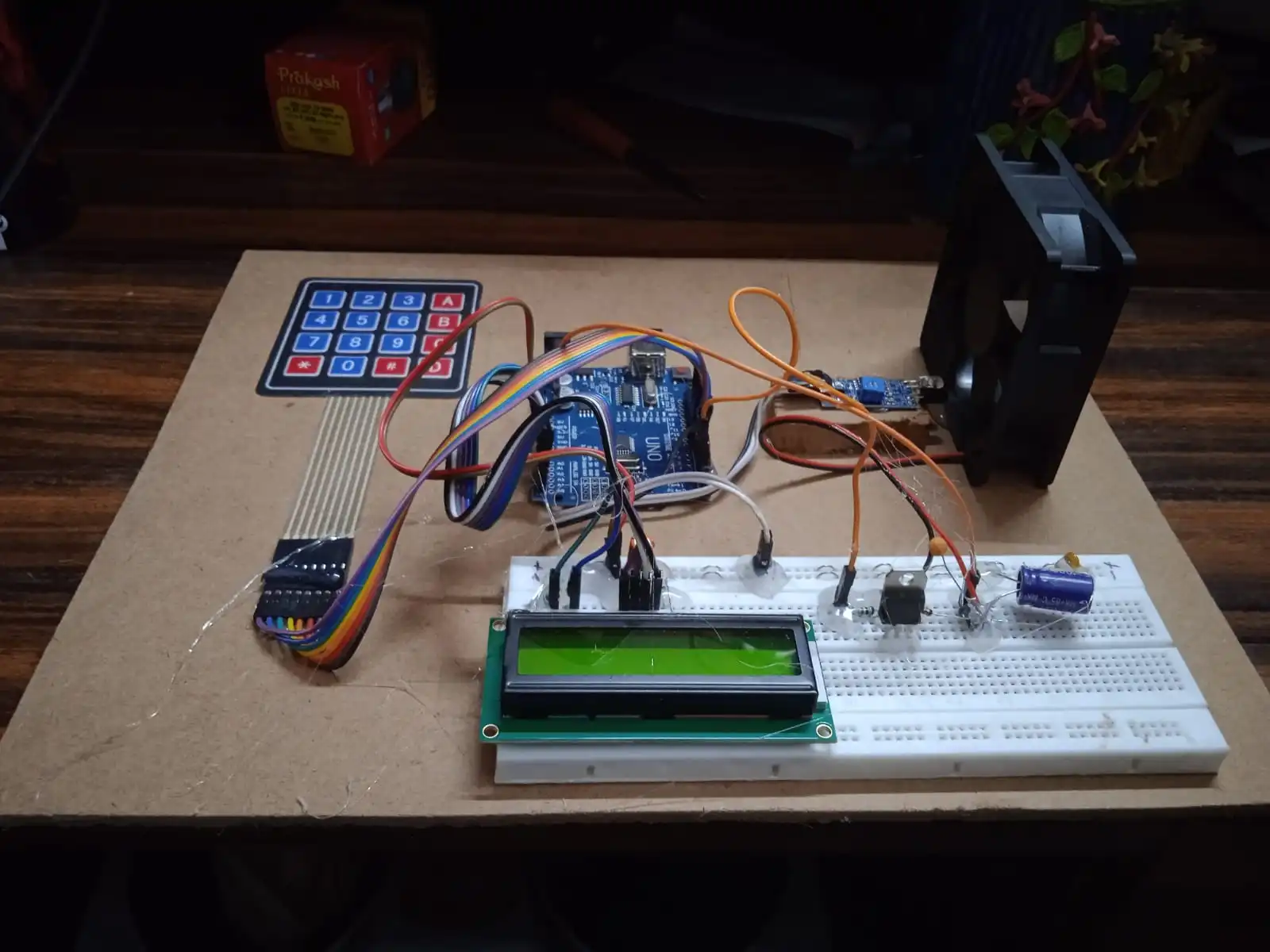
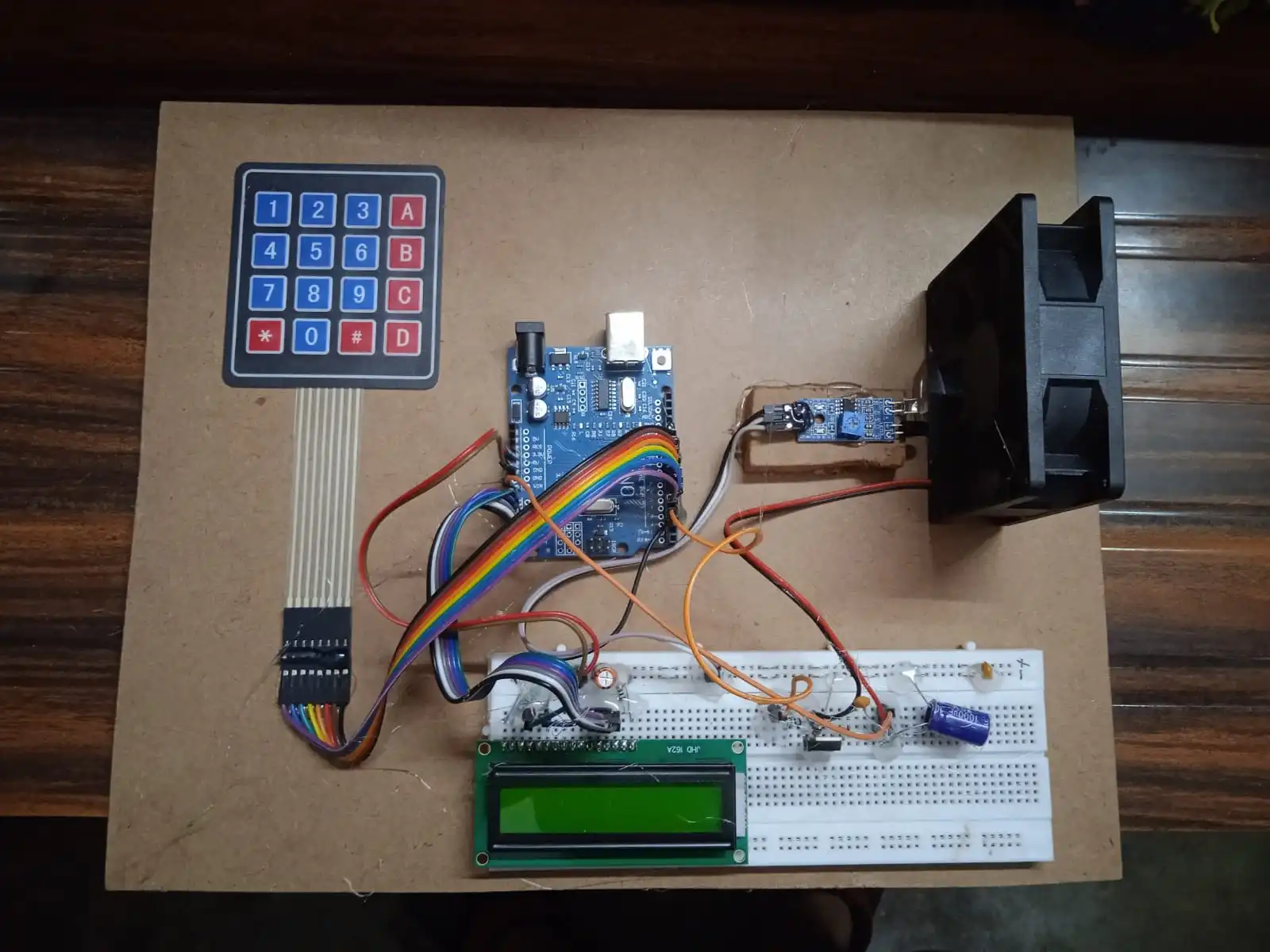
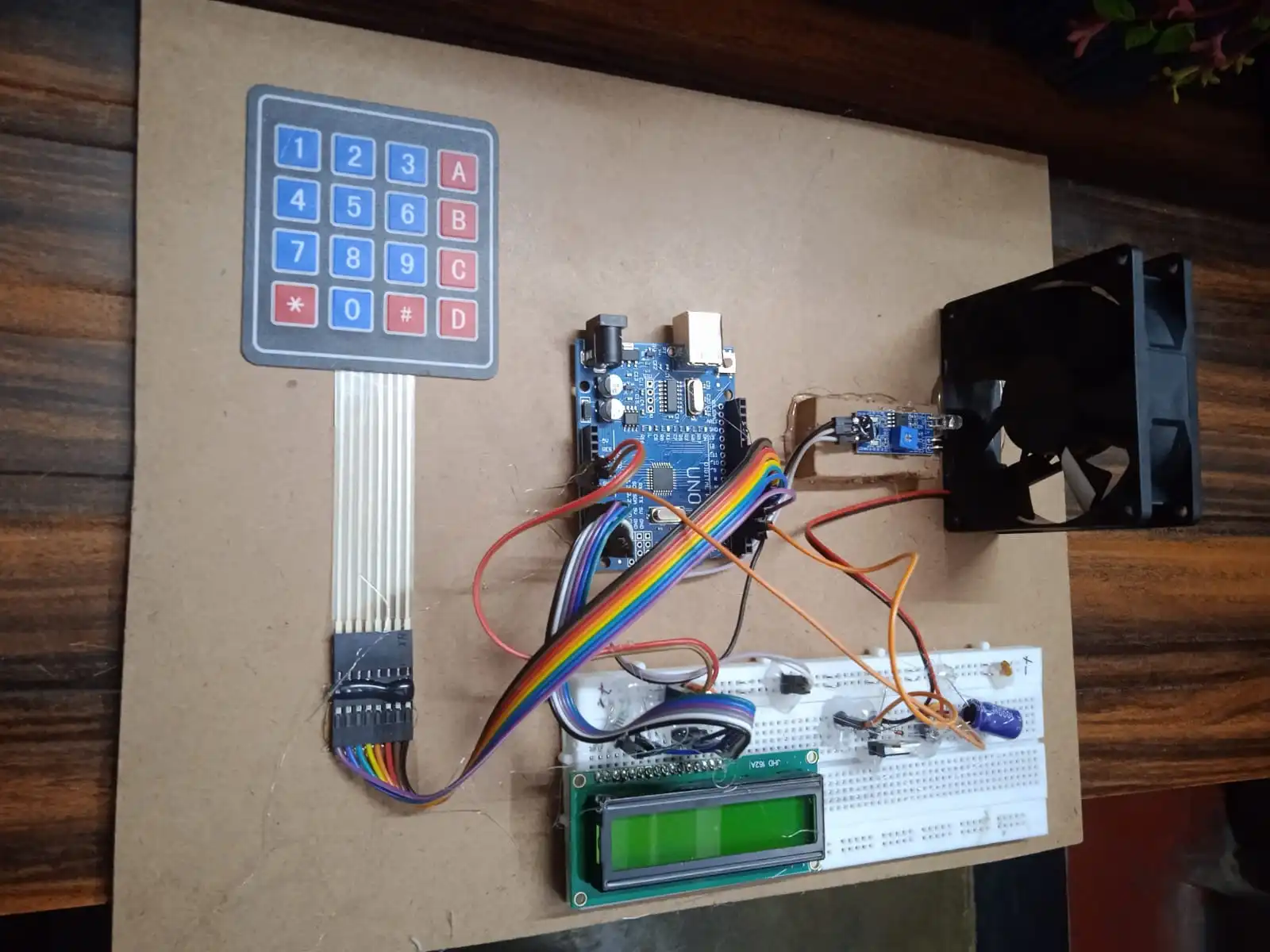
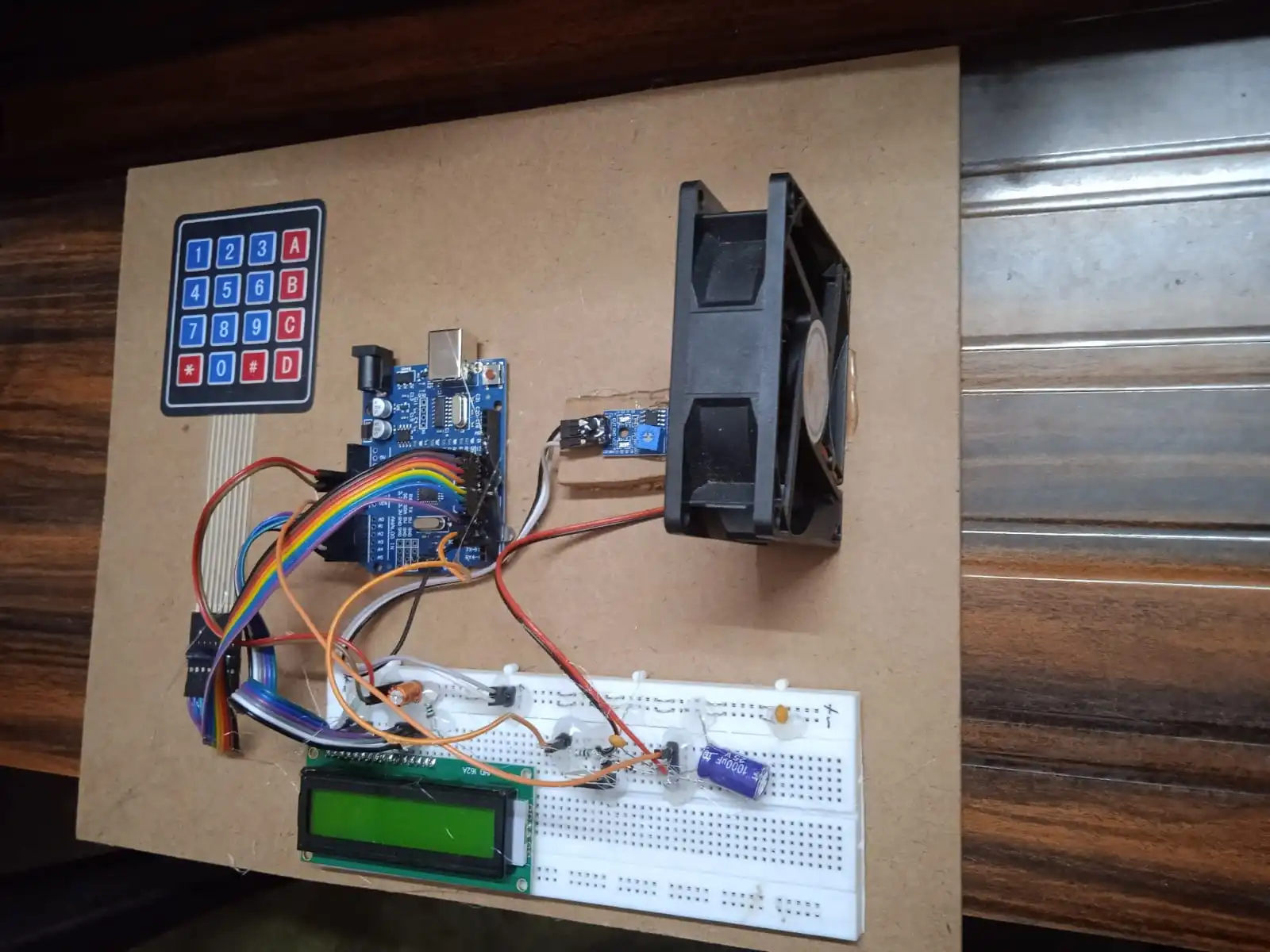
    This project outlines the development of a BLDC motor speed controller using an Arduino, LCD module, keypad, and various electronic components. The device allows users to set a desired RPM (Revolutions Per Minute) for the motor and displays both the current and target RPM on the LCD screen.

    Components

    • Arduino Uno (or compatible board)
    • BLDC Motor
    • LCD Module (e.g., 16×2 character display)
    • 4×4 Keypad
    • Breadboard
    • Power NPN Transistor (e.g., TIP120)
    • 12V Power Supply
    • Jumper Wires
    • Resistors (values depend on LCD and keypad)

    Functionality

    1. Setting Target RPM: The user presses the asterisk (*) key, clearing any previous data on the LCD. Subsequent key presses enter the desired RPM digit by digit. Pressing the hash (#) key confirms the target RPM.
    2. RPM Display: The LCD continuously displays the current RPM of the BLDC motor, obtained by sensing the motor’s speed using appropriate methods (discussed later). The target RPM is also displayed for reference.
    3. Speed Control: The Arduino controls the BLDC motor using the power NPN transistor acting as a switch. By adjusting the Pulse Width Modulation (PWM) signal sent to the transistor, the Arduino regulates the power delivered to the motor, influencing its speed. The system aims to maintain the motor’s RPM close to the target value through control algorithms implemented in the Arduino code.

    Report Sections

    A well-structured report should include the following sections:

    1. Introduction: Briefly describe BLDC motors, their speed control importance, and the project’s objective.
    2. Components: List the components used and their functions. Include specifications for key components like the motor and LCD.
    3. Circuit Diagram: Illustrate the circuit schematic with clear labeling of components and connections.
    4. Arduino Code: Explain the program logic. Briefly discuss how the code reads keypad input, controls the LCD display, reads motor speed (sensor selection and code implementation needed), and implements the control algorithm (e.g., proportional-integral control) to maintain the target RPM.
    5. Testing and Results: Describe the testing procedures to verify the functionality. Discuss achieved results, including the accuracy of RPM measurement and the effectiveness of the speed control mechanism. Mention any limitations or areas for improvement.
    6. Conclusion: Summarize the project’s achievements and potential applications.

    Additional Considerations

    • Motor Speed Sensing: Explore methods to sense the BLDC motor’s speed. Options include using Hall effect sensors mounted on the motor or back-EMF sensing techniques. The Arduino code will need to be adapted based on the chosen method.
    • Control Algorithm: For maintaining the target RPM, consider implementing a simple proportional-integral (PI) control algorithm in the Arduino code. This is a common approach for motor speed control.
    • Safety: Exercise caution while working with electronics and BLDC motors. Ensure proper power supply connections and consider adding safety features like motor current limiting.

    Report Note

    This is a guide to help you structure your report. You’ll need to fill in the specific details of your project implementation, including circuit component values, chosen speed sensing method, and control algorithm code.
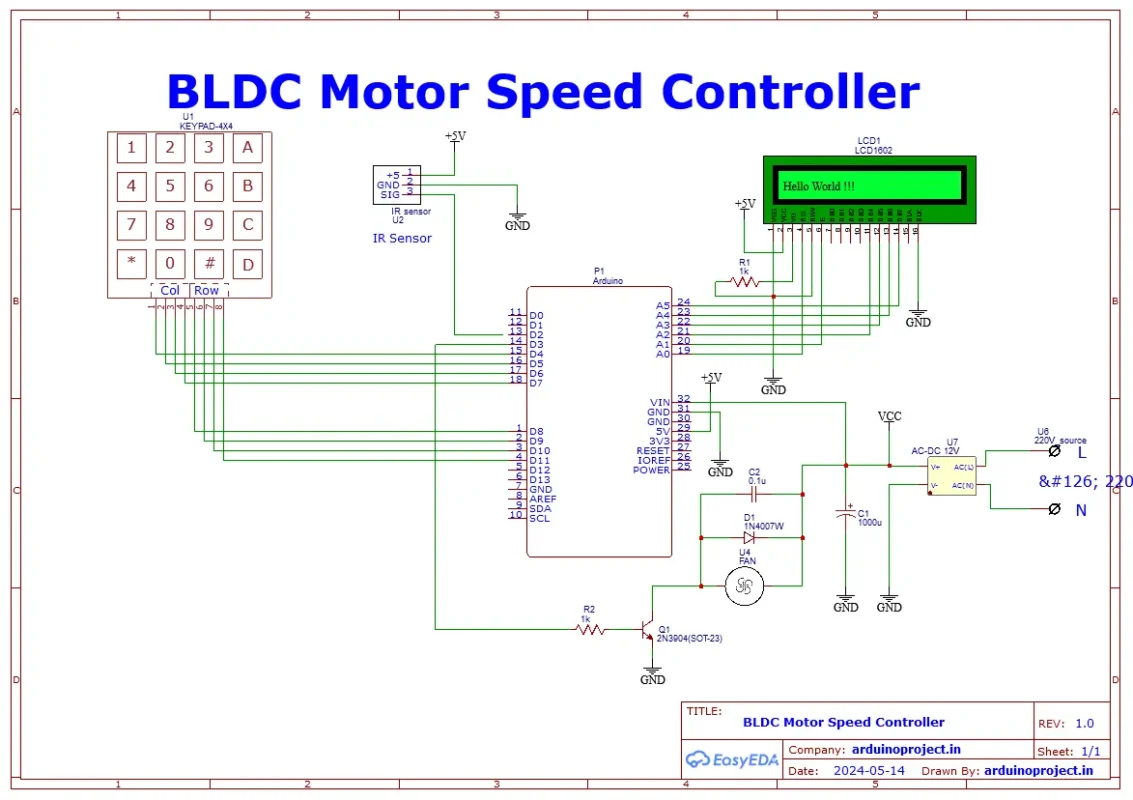
    Schematic_BLDC-Speed-Controller-With-RPM_2024-05-14
    Loading
    Reviews (0)

    Reviews

    There are no reviews yet.

    Only logged in customers who have purchased this product may leave a review.

    Fill Form & Contact us

    Loading

    You may also like…

    Add to cart
    Quick view
    Compare
    Add to wishlist

    RFID Shopping Trolly with Google Sheet & Telegram Interface

    Arduino Projects, ESP32 Projects
    Rated 0 out of 5
    ₹7,500.00
    Add to cart
    Quick view
    Compare
    Add to wishlist

    Drain Alert for Sewage Treatment Plant with SMS & GPS Location

    Arduino Projects
    Rated 0 out of 5
    ₹6,000.00
    Add to cart
    Quick view
    Compare
    Add to wishlist

    RFID Attendance System On Google Sheet V1

    ESP32 Projects, Our TOP IOT Projects
    Rated 0 out of 5
    ₹6,000.00

    Related products

    Add to cart
    Quick view
    Compare
    Add to wishlist

    RFID Door Opener Using Arduino

    Arduino Projects
    Rated 0 out of 5
    ₹4,000.00
    Add to cart
    Quick view
    Compare
    Add to wishlist

    Over Load Protector Using Arduino With GSM

    Arduino Projects
    Rated 0 out of 5
    ₹7,000.00
    Add to cart
    Quick view
    Compare
    Add to wishlist

    Digital Speedo Meter Using Arduino

    Arduino Projects
    Rated 0 out of 5
    ₹3,000.00
    Add to cart
    Quick view
    Compare
    Add to wishlist

    Density Based Traffic Light Using Arduino

    Arduino Projects
    Rated 0 out of 5
    ₹4,500.00
    Add to cart
    Quick view
    Compare
    Add to wishlist

    Auto Phase Selector Using Ardunio

    Arduino Projects, Electrical Projects
    Rated 0 out of 5
    ₹3,500.00
    Add to cart
    Quick view
    Compare
    Add to wishlist

    Automatic Train Crossing Using Arduino

    Arduino Projects
    Rated 0 out of 5
    ₹5,000.00
    Add to cart
    Quick view
    Compare
    Add to wishlist

    Smart Dustbin Using Arduino with Ultrasonic Sensor

    Arduino Projects
    Rated 0 out of 5
    ₹2,500.00
    Add to cart
    Quick view
    Compare
    Add to wishlist

    Agriculture Robot Using Wireless with Arduino with Solar Panel

    Arduino Projects
    Rated 0 out of 5
    ₹10,000.00
    2025 CREATED BY http://projectiot.in. PREMIUM PROJECT SOLUTIONS.
    payments
    • Menu
    • Categories
    • ESP32 Projects
    • ESP8266 Projects
    • 8051 Projects
    • PIC Microcontroller Projects
    • Arduino Projects
    • Blynk App IOT Project
    • Our TOP IOT Projects
    • Arduino Projects With Android App
    • ESP32 Camera Projects
    • Electrical Projects
    • Mini Projects
    • PI PICO W Projects
    • Home
    • Shop
    • Track Order
    • Contact Us
    • About us
    Shopping cart
    close

    Sign in

    close

    Lost your password?

    No account yet?

    Create an Account

    HEY YOU, SIGN UP AND CONNECT TO WOODMART!

    Be the first to learn about our latest trends and get exclusive offers

    Will be used in accordance with our Privacy Policy

    Shop
    0 Wishlist
    0 items Cart
    My account