


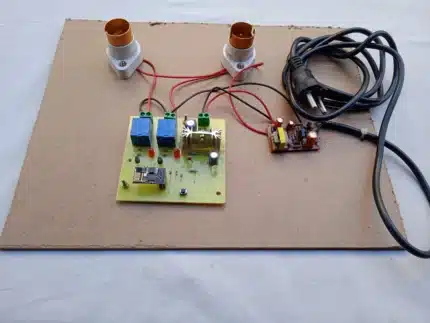
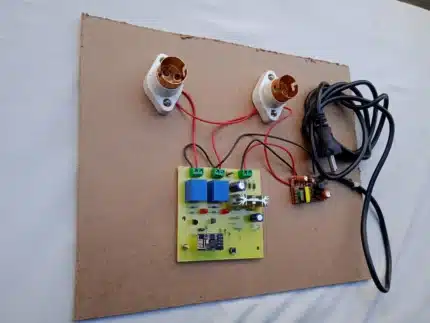
In this project we are using Node Mcu to control 4 home appliance. In android app there is voice control option. As you click on mic image, app will start listing your voice. Voice command’s are fixed, you have to only speak to control device. As device will update there status, that will also update on your app.
commands:
turn on room light
turn off room light
turn on child room light
turn off child room light
turn on fan
turn off fan
turn on lamp
turn off lamp
We have attached manual & app in zip file. To download place order, choose payment mode bank transfer. Contact us & we will open download option for.
You dont’ have to make any payment for this, until you purchase hardware.
Voice-Controlled Home Automation with Remote Access
Hardware Components:
- Microcontroller: Select a microcontroller board like Arduino Uno, ESP8266, or Raspberry Pi (depending on your project complexity and desired features). These boards offer processing power, I/O pins, and Wi-Fi connectivity (except Arduino Uno, which requires an add-on Wi-Fi shield).
- Relays: Use relays to control the power flow to your appliances. Match the relay type (AC or DC) and switching current capacity to your appliances’ requirements. Consider using a relay module for convenience, which combines multiple relays and drivers in a single package.
- Sensors (Optional): Add sensors (temperature, humidity, motion, etc.) to create more interactive automation based on environmental conditions.
- Breadboard and Jumper Wires (for Prototyping): These facilitate easy circuit construction and testing during the development phase.
- Power Supply: Choose a power supply that matches the voltage and current requirements of your microcontroller, relays, and other components.
- Voice-Controlled App Interface: Utilize a smartphone or a dedicated voice assistant device (like Amazon Echo or Google Home) as the voice input source.
Software Components:
- Microcontroller IDE (Integrated Development Environment): The Arduino IDE, ESP-IDF (for ESP8266/ESP32), or Raspberry Pi OS (for Raspberry Pi) are popular options for programming your microcontroller.
- Cloud Server or Database: Select a cloud platform (e.g., Firebase, AWS IoT Core, Adafruit IO) or a self-hosted server to store device status and receive/send commands.
- API (Application Programming Interface): Develop APIs on your server-side code to handle device communication and remote access.
System Overview:
- Voice Recognition: The voice control app (e.g., smartphone app, voice assistant) recognizes your voice commands and converts them into text.
- Command Transmission: The app sends the text commands (e.g., “Turn on lights”) to your cloud server via an internet connection.
- Server Processing: The cloud server verifies the command, updates the device status in the database, and potentially triggers automation routines based on pre-defined rules.
- Command Reception: Your hardware periodically checks the cloud server (e.g., every 3 seconds) for updated device status.
- Device Control: Based on the received commands and local sensor data (if applicable), the microcontroller activates relays to control your appliances or executes other actions.
Remote Access:
- Implement user authentication and authorization mechanisms on your server to restrict unauthorized access.
- Design a user-friendly interface (e.g., web app, mobile app) that allows remote monitoring and control of your devices. This interface can interact with the cloud server to view device status, send control commands, or manage automation rules.
Additional Considerations:
- Security: Secure communication between devices and the server is essential. Encrypt data transmission (using HTTPS, TLS, etc.) and implement authentication protocols to prevent unauthorized access and control.
- Scalability: Design your system with future expansion in mind. This might involve using modular hardware components and a software architecture that can accommodate additional devices and functionalities.
- Error Handling: Develop robust error handling mechanisms to gracefully handle network connectivity issues and unexpected server responses. Provide informative feedback to the user in case of errors.
- User Experience: Prioritize a user-friendly voice control experience with natural language recognition and clear feedback on the execution of commands.
Beyond the Basics:
- Machine Learning: Integrate machine learning algorithms on your server or microcontroller to create more intelligent automation based on usage patterns and sensor data.
- Real-time Monitoring: Implement real-time device data visualization on your remote access interface for enhanced awareness and control.
By following these guidelines and incorporating the valuable insights from the ratings, you can create a comprehensive voice-controlled home automation system with secure remote access capabilities.









Reviews
There are no reviews yet.